ies Creator
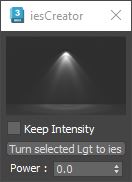
Drop an ies file on the ies Creator window to create a new VRay ies object. If a VRay ies object is already selected, the script will update the Drag and drop an ies file onto the ies Creator script to instantly create a new V-Ray ies light. If a V-Ray ies light is already selected, dropping a new file will update its profile. Convert any light object to a V-Ray ies light with a single click, and conveniently edit the power and ies profiles of multiple selected lights simultaneously. Managing your ies lighting is now quick and easy.